Team Changeover
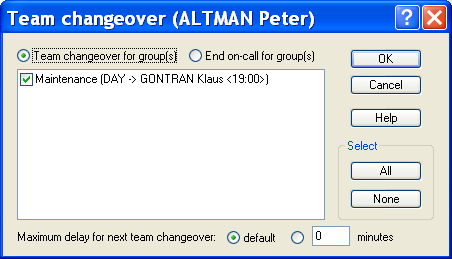
To declare the beginning or the end of his on -call period (clock in or out), an operator can select the Team changeover... command in the Operation menu, or simply click on the button .
Remark: A team changeover also can be directly ordered from the contextual menu displayed when clicking with the mouse right button on the icon of the team to change in the tree of the main then selecting the command Team changeover or End on-call (see § 4.6.1.10 "Teams"). According to the selected management mode of the team changeover (see § 5.4.1 "On-call group properties"), this operation can be required or not:
- If the Team chang eover mandatory option is not checked (default mode), the team changeover is performed automatically according to the planned on -call schedule. A team changeover operation can be forced, but only in the case of a changeover made in advance (before the end of the planned period) or an early end of the on-call period.
- If the Team changeover mandatory option is checked, the team changeover operation has to be performed by one of the users of the new on -call team, at the time scheduled for the team changeover, within a configurable deadline. If the team changeover has not been performed when the deadline is reached, a team changeover fault is signaled with possibility of alarm trigging. Similarly at the end of the on -call period, if no other team is planned, one of the users of the on -call team has to clock out. Failing which the team will remain on-call beyond the planned period.
Team changeover The Team changeover selection designates a clock-in operation: the operator clocks in to begin its on -call period. After validation, the user (and its team) will be on -call for all the selected groups.