User Interface Overview
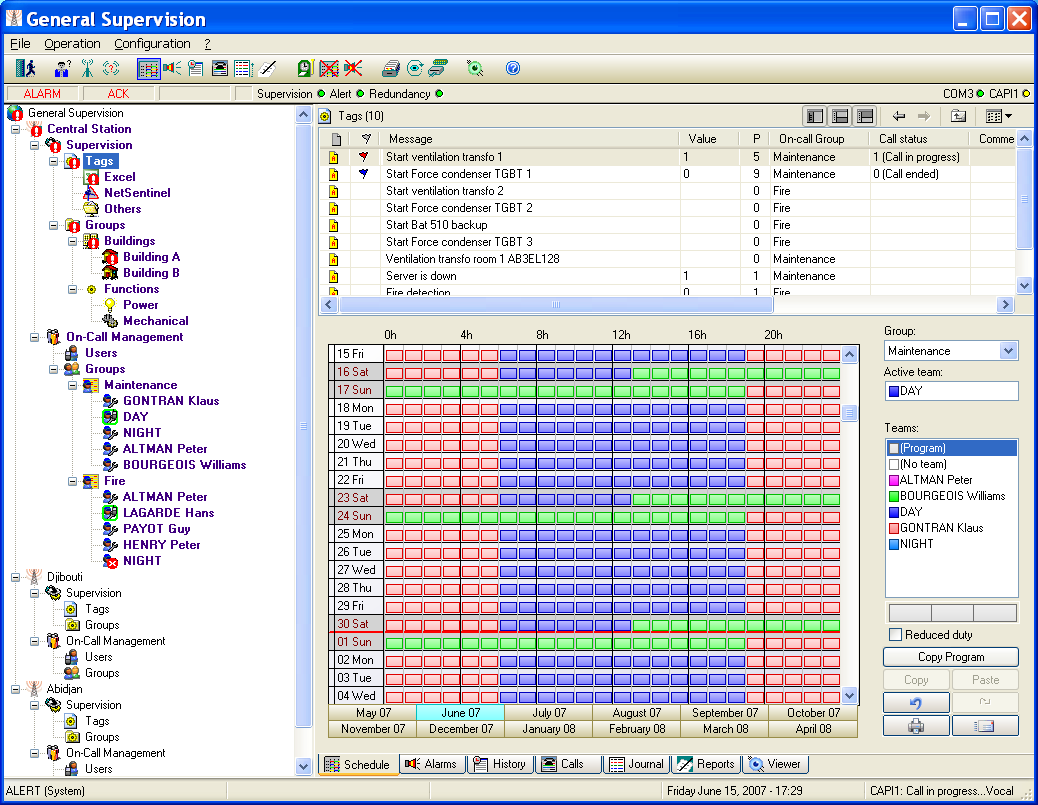
Once identified (see § 4.1 "Login"), the operator is in front of the following screen (some menus or buttons can be masked according to the user profile and the configuration of this one).
This screen includes:
- A configurable title bar allowing the alert station to be named.
- A menu bar containing all the commands of the application.
- A tool bar offering a quick access to the commands.
- An alarm status bar allowing the visualization of the general working state.
- A general status bar at the bottom of the screen. The central part of the display constitutes the main screen, made up of threes parts:
- On the left part, a topographical representation of the application, under the form of a tree of the stations with sub -trees for description of the supervision and on -call management attached to each station.
- On the top right part, a synoptic view of the entity selected in the tree (station, list of supervised tags, functional group, user list, on-call group, team, ...).
- On the bottom right part, a tabbed application window (on-call schedule, alarm table, alarm history, call overview, event log, logbook, viewer).