Schedule Derogation / Call Locking
End on-call The End on -call selection designates a clock -out operation. The operator clocks out to signal that he leaves (with its team) and its on -call time is over. After validation, nobody is on-call for the selected groups. Note: The "End on -call" operation is not required when a team replaces an other. The changeover of a team A to a team B ends the on-call time of the team A. If the "Team changeover mandatory" mode is selected, The "End on -call" operation provokes the transition to the "Waiting for team changeover" state with a timeout initialized to the default value configured as "Maximum delay for team changeover" for the group. If the scheduled team (if it is defined) has not clocked before the end of this timeout, the "ChangeoverStatus" variable of the concerned group changes to the state 3 ("Timeout for team changeover expired"), with possibility of trigging an alarm. List of groups This list displays the groups for which the identified operator (designated in the title bar) can perform a team changeover, begin or end of on call period according to the selection "Team changeover " / "End on-call".
- Team changeover The list displays all the candidate groups for which the user designated in the title bar can clock in, with the proposed team in brackets. The proposed team is either the scheduled on-call team if it is not yet active or the next schedul ed on-call team if the active team is this one that was planned. Only the groups having a team to propose and for which the user belongs to the proposed team are displayed.
- End on-call The list displays all the candidate groups for which the user designate d in the title bar can clock out, with the concerned team in brackets. Only the groups for which the user belongs to the active team are displayed. Click on the All button to select all the groups proposed for the team changeover. Click on the None button to unselect all the groups proposed for the team changeover. Maximum delay for next team changeover This option defines the maximum authorized time to perform the next team changeover. The default option selects the default value of the group (see § 5.4.1 "On-call group properties"). At the end of the on -call period of every selected group, if no team changeover has been performed, this time is counted. When the defined time is expired wit hout team changeover, the "ChangeoverStatus" variable of the concerned group changes to the state 3 ("Timeout for team changeover expired"). This variable, which can be consulted by DDE or API, can be used to trig an alarm.
If necessary (during an intervention on site for example), it is possible to temporarily depart from the on-call schedule of a group by forcing this group in derogation state. When a group is in derogation state, its on -call schedule is ignored and all the alarm calls for the group either are redirected to a team which was predefined at the derogation time,
or they are discarded or suspended 1 (calls locked) if no team has been designated for the call redirection. To lock the calls for a given group, sel ect the Calls locked command in the contextual menu displayed when clicking with the mouse right button on the icon of the group in the on-call management tree (see § 4.6.1.9 "On-call groups "). The icon of the locked group signals that the group cannot be called: . To unlock the calls for a given group, select the same command in the contextual menu displayed when clicking with the mouse right button on the icon of the grou p (command checked to signal locked status of the group). If a team is planned in the schedule, it automatically becomes on -call and the icon of the group signals that the group can be called again: . To redirect the calls addressed to a g roup to a team of the group, select the On-call (forced) command in the contextual menu displayed when clicking with the mouse right button on the icon of the team in the on -call management tree (see § 4.6.1.10 "Teams"). The icon of the forced team signals that the team is active: . To end the redirection of the calls to a team, select the same command in the contextual menu displayed when clicking with the mouse right but ton on the icon of the team (command checked to signal forced status of the team). The team which is planned in the schedule then automatically becomes active. To force one or more groups in derogation state, or consult the list of groups in derogation state, select the Schedule Derogation... command in the Operation menu or click on the button .
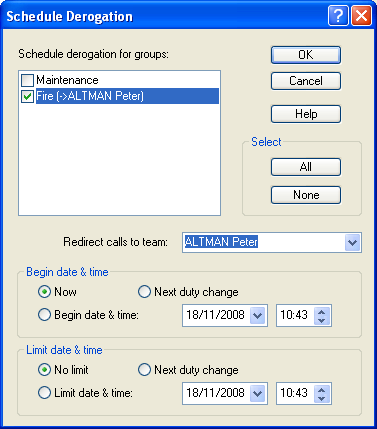
This command displays the following dialog box:
Schedule derogation... The list displays the whole of groups with their current derogation state. Groups in derogation state are checked.
1 Following the call option "Discard call if no team to call when alarm is activated ".
When a group is in derogation state, all calls that concern it are redirected to the derogation team (indicated in brackets on the right of the group name). If t here is no derogation team designated, calls are discarded or suspended according to the call option Discard call if no team to call... (see § 7.5 "Call options"). Click on the checkbox of a group to change it in derogation (box checked) or in normal on-call state (box not checked). Click on the All button to change all groups to derogation state. Click on the None button to change all groups to normal on-call state. Redirect calls to team When a group is selected in the list, one can select the associated derogation team in the list Redirect calls to team. This team will be the one to which will be redirected all the calls intended to the group in question when this last is forced in dero gation state (checked in the group list). The dropdown list displays the list of all defined teams for the selected group. The choice "(none)" means that there is no derogation team for the selected group. Begin date & time This group defines the begin time for the derogation of the selected groups:
- If the Now option is checked (default option), the selected groups are immediately set in derogation state, after validation by clicking on the OK button.
- If the Next duty change option is checked, the selecte d groups are set in derogation state at the next team changeover.
- If the Begin date & time option is checked, the selected groups are set in derogation state at the date and time defined in the adjacent field. Limit date & time This group defines the limit time for the derogation of the selected groups:
- If the No limit option is checked (default option), the selected groups remain indefinitely in derogation state, until an explicit command to end the derogation.
- If the Next duty change option is checked, th e selected groups remain in derogation state until the next team changeover.
- If the Limit date & time option is checked, the selected groups remain in derogation state until the date and time defined in the adjacent field. When at least a group is in derog ation state, the " DEROG." indication is displayed in the fault indicator of the alarm status bar. The changes of derogation state are recorded in the event log.