Control of DDE and OPC Links
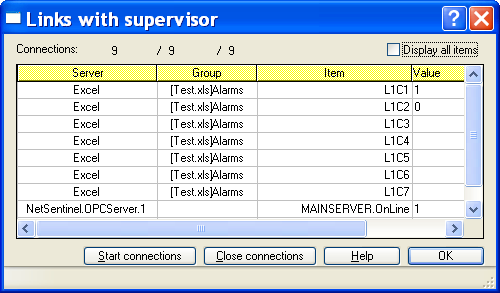
To control the state of the connections established with the DDE or OPC server applications, select the Links... command from the File menu.
The link list contains a list of all the items currently polled by DDE or OPC, for which the connection with the DDE or OPC server has been established, and a response to a first request has been received: Server Name of the server application Group Name of the variable group (DDE topic for DDE variables) Item Name of the item Value Current value of the item This list can be customized1. Connections The number of established connections is indicated above of the list under the form: Number of response received / Number of connections established / Number of connections to establish
1 This list can be entirely customized (selection of columns to display, order, width and title of columns, alignment of the title or the column content). To perform this customization, position the mouse cursor on the column of which one wants to modify the presentation and click on the right button of the mouse. Select then the adequate command in the displayed contextual menu. The new configuration is automatically saved to be restored for the next sessions. The width of each column can be visually adjusted by positioning the mouse cursor on the concerned size bar of the title line, then clicking and dragging the bar to get the wanted size. This list can also be sorted according to the increasing or de creasing order of each of its columns. To do this, click on the title of the wanted column: an arrow will indicate the increasing sense of the sorting. Click again on the title of the column to reverse the sort order (reversed arrow). To perform a fast re search for a value in the list, select the research column by clicking on its title, then scroll the list with the scroll bar: a "bubble" displays the content of the selected column for the 1st line of the list corresponding to the scroll bar position.