ALERT Supervision
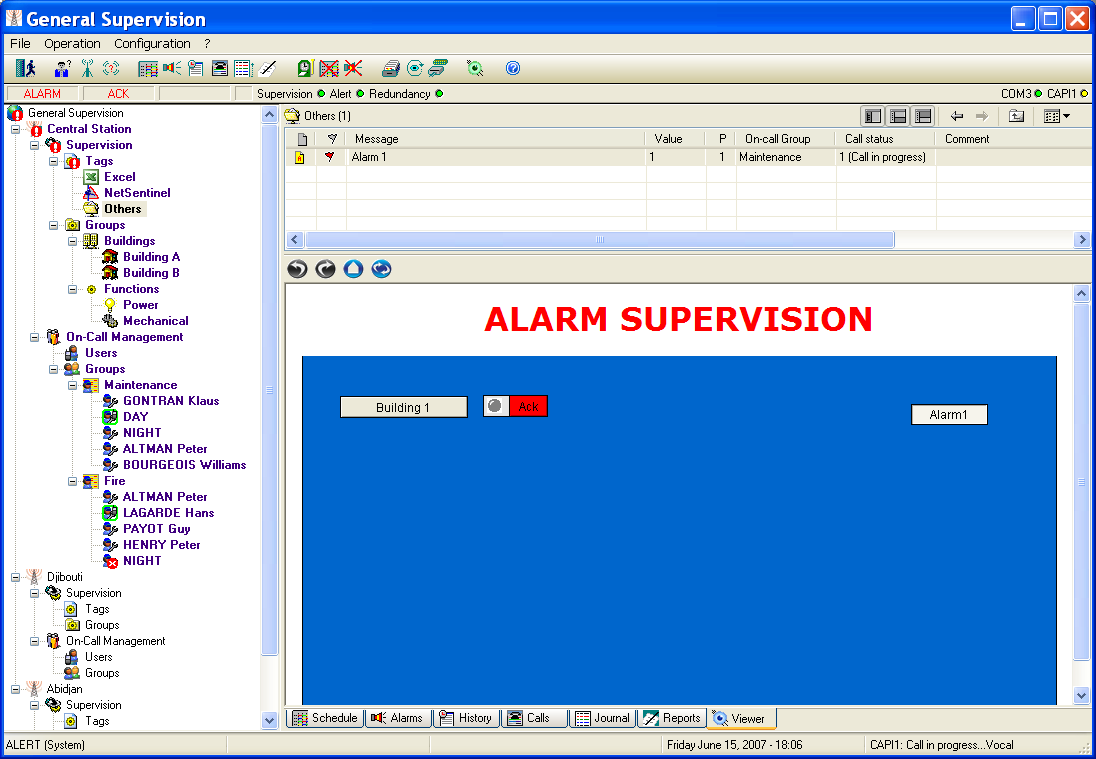
To display the Alert supervision screen, select the Supervision... command in the Operation menu. One can also display the supervision page by directly selecting the Supervision tab on the bottom of the main screen. Note Alarm supervision feature is only available when the Supervision Plugin is validated (with the authorized max number of supervision tags) and the supervision server is activated (see Alert viewer configuration).
This screen displays synoptic views of the supe rvised installation, in order to have a visual control of statuses and measures or to localize alarms on a site map.
The supervision server module is a DLL module derived from the Visual Access software. It can manage a set of HTML pages and interact with Java applets embedded in these pages in order to visualize and animate synoptic views on client stations simply equipped with a web browser. The Java applets can integrate animated images (gif) and various dynamic graphic elements, allow ing site maps, buttons, animated objects (lights, bar graphs, bowls, gates...) and curves to be displayed.
Animation data are provided by the VADB module, data server capable of centralizing and recording data from various sources through its integrated com munication drivers (DDE, OPC, Modbus...).
The content of the visualized pages can be edited by using the associated synoptic editor VAEdit, by selecting the Screen Editor... command in the Configuration menu or clicking on the toolbar button . The synoptic editor is only accessible when the Screen editor licence has been validated.
The pages provided by the supervision can be directly visualized on the Alert user interface (Server or Client stations) through this supervision screen, a real web browser integrated in the software as a plug-in. The navigation bar displayed on the top of the supervision window contains the main navigation commands of a web browser: Previous page Next page Home page Refreshing of the displayed page The home page is defined in the Web browser page setup dialog box.