Programmed Station Synchronizations
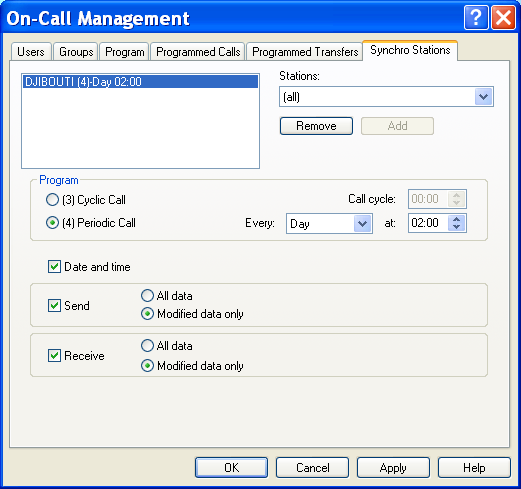
To configure the programmed station synchronizations, select the "On-call management" command from the " Configuration" menu, or click on the button . On the tabbed dialog box displayed, select the "Stations synchro" tab.
To be able to synchronize remote stations, it is necessary first to define for every remote station a (virtual) operator having a call number attached to a synchronization driver (Alert Modem, Alert Socket, Alert Direct). The list on the left top of the dialog box displays the programmed synchronizations for the station selected in the Stations dropdown list. If the selection is "(all)", this list displays all the programmed synchronizations. In this case, it is not possible to create a new programmed synchronization (Add button is grayed). The station list displays the list of operators configured with a dial number attached to a driver allowing station synchronization (Alert Modem, Alert Socket, Alert Direct) and who have the same name as one of the defined station. A programmed synchronization is defined by a line containing: the name of the station to call, the call type : (3) for cyclic call, (4) for periodic call.
the period of the cyclic call or the day and time of the periodic call. To create a new programmed synchronization
- Select the concerned station in the dropdown list.
- Select the call type: cyclic call or periodic call.
- In case of a cyclic call, define the call cycle. In case of a periodic call, select the day of the call (a specifi c week day or every days) in the drop down list Every, then define the call time for the selected day.
- Define the synchronization options:
The synchronization options are:
Date and time. The calling station set the date of the called station. To be able to set the date and time, the called station needs the Alert driver option "Date and time updates enabled" to be selected. Configuration synchronization . If the local station is the main station, the synchronized data are the data associated to the called station. If the local station is a remote station, the synchronized data are its own data. For both case, we can send and/or receive all the configuration data or only the modified data (since the last synchronization). The synchronized data are the users , the call groups, the teams, the alarm groups, the on-call schedule and the tags. 5) Finally click on the Add button located below the station list. For a given station, only one programmed synchronization can be defined. But it is possible to define several periodic programmed synchronizations for the same station.
To delete a programmed synchronization Select it in the programmed synchronizations list then click on the Remove button. To modify a programmed synchronization Select it in the programmed syn chronizations list, modify the wanted parameters then click on the Add button. Remark: if the call type or the period of a periodic call is changed, a new programmed synchronization is created.