Redundancy: Functions
Failover of the Main Station to the Backup Station
Four key parameters govern redundancy activation with "Automatic switch" enabled:
- The link state
- Communication ports status (single or multiple ports)
- Connection to redundant station
- Station type (primary or secondary)
Connection loss with the redundant station triggers automatic activation. When the link exists, the active station follows the conditions in the summary table below.
Summary of Possible Cases
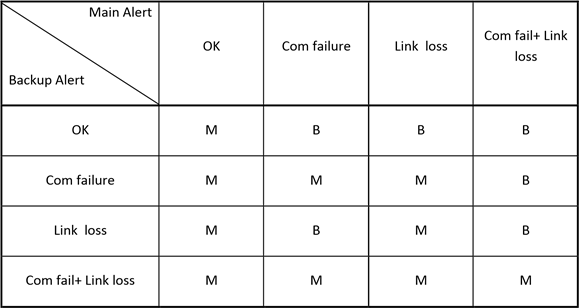
Port failure conditions depend on the switchonportfail option in the .ini file. When enabled, failure occurs if at least one port fails. When disabled, all ports must be unable to function for the failure to activate.
Distinct Functions
1. Automatic Failover
The backup assumes control upon detecting loss of link with supervision, modem failure on the main station, or failure of the main station itself. By default, failover occurs only when all modems fail. An optional setting enables failover for single modem failures, with the station having more active modems becoming active.
2. Manual Switch
Supervision software determines whether to switch to the secondary station and executes the switch, requiring consideration of ALERT states.
3. Switching During a Call
When the backup takes over mid-call, it resumes the call cycle at the same point as the main station, continuing with operators not yet contacted and resetting attempt counts for operators already called.