Commands
The Alert software is capable of initiating commands to write external variables or outputs, in reaction to an event activation or reset or an alarm acknowledgment. A command can be used, for example, to activate a siren or a flashing light, or, during a call cycle, to signal the call procedure failure or to command an external relief call system. Each command is designated by a name and is made up of a sequence of basic writing commands of ex ternal variables (by DDE or OPC) or outputs (through a communication driver), with timer capability. The controlled variables and outputs are designated in the sequence. The value written on each variable or output can be predefined in the sequence and can include the content of supervised tags. A default value can also be redefined when referring to the command in the action list attached to an event. This default value will be applied to every variables and outputs that are not defined in the sequence. It allows the same command to be used to write various values in function of the command origin. The commands can be defined when configuring an action of type "Execute command" (see § 5.15.4 "Execute command"), an on -call group (see § 5.4.1 "On-call group properties") or a user call number of type "Command" (see § 5.1.3 "Dial number definition"). It also can be defined when configuring the "Command" driver (see § 8.9 "Command driver").
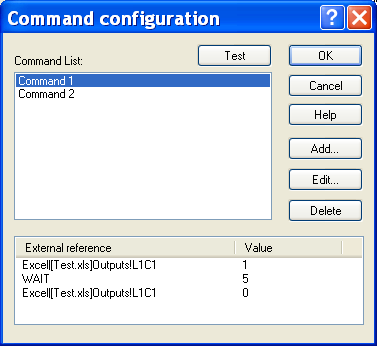
Command List Display the list of defined commands.
Command description Sequence of writing commands to external variables or outputs which corresponds to the command selected in the command list. Button Test Click on this button to execute for test the command selected in the list. Button Add... Click on this button to create a new command (see below. Button Edit... Click on this button to modify the parameters of the command selected in the list (see below). Button Delete Click on this button to delete the command selected in the list.
A command is made up of a sequence of basic writing commands of external variables (by DDE or OPC) or outputs (through a communication driver), with timer capability.
The controlled variables and outputs are designated in the sequence. The value written on each variable or output can be predefined in the sequence and can include the content of supervised tags. A de fault value can also be redefined when referring to the command in the action list attached to an event. This default value will be applied to every variables and outputs that are not defined in the sequence. It allows the same command to be used to write various values in function of the command origin.
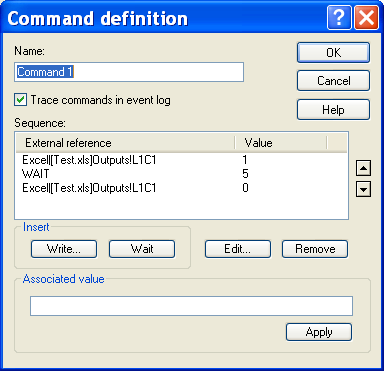
Name This field designates the command by an explicit name. This name must be unique in the command list. Trace commands... When this option is checked, the command execution will be traced in the event log. Sequence This list displays the ordered sequence of variables and outputs that will be written during the execution of the command. Each variable or output is designated by an external reference under the form : "server|topic!item" (DDE reference), "server\item" (OPC reference) or "driver##block##output" (driver reference). The value to write can be set when defining the command ( Value column). That value can also be defined later, every time the command is used. The defined sequence can include timers ("Wait"), with time counted in seconds. Use the buttons and to modify the execution order of the sequence by moving respectively up and down the external reference or the timer selected in the list. Button Write... Click on this button to add a new variable or output reference to the sequence (see § 5.10 "Selection of an external tag "). In the displayed dialog box, select the desired type (DDE, OPC or external) and reference. Button Wait Click on this button to insert a timer in the sequence. Define the value of the wished time to wait in the field Associated value (time in seconds) then validate the typed value by clicking on the Apply button. Button Edit... Click on this button to modify the external reference selected in the list. This action displays the dialog box of selection of an external variable (see § 5.10 "Selection of an external tag"). Button Remove Click on this button to remove from the sequence the external reference or timer selected in the list. Associated value When an external reference is selected in the list, this field defines the value to write in the variable or output designated by the selec ted external reference. This value can be any numerical or alphanumeric string. It can include tab chars, but they have to be coded under the form "&T". If this field is empty, the written value will be the default value which is defined when selecting the command in an action of type "Execute Command". The value to write must be validated by clicking on the Apply button. The value to write can contain variable fields that will be updated at the time of the command execution. To integrate the content of a s upervised tag, click on the button . In the displayed dialog box, select the desired tag then validate. The numerical identifier of the tag is inserted in the edit field at the current cursor position, under the form: &(tag id).