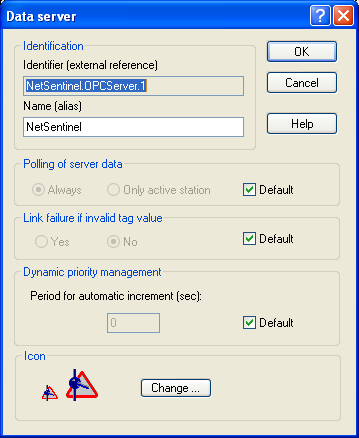
Data Server Properties
This option is displayed only when the Alert stations option is checked in the general options (see § 7.1 "General options") and only for the local station (first station of the tree in the main screen). Display Display options for the remote station in the tree of the main screen. The " Display supervision" op tion validates the display of the "Supervision" branch in the sub-tree attached to the station. The "Display on-call" option validates the display of the "On -call Management" branch in the sub-tree attached to the station. This choice is only possible on the station of type "Alert station". Icon Representation of the station in the supervision tree. Click on the Modify... button to select another representation (small and large icon).
This dialog box defines the properties of a data server. It is called from the tree of the main screen (see § 4.6.1.5 "Data servers").
Identification The field Identifier defines the external reference of the data server ((<Server>|<Topic> for the DDE servers, <Server> for the OPC servers, simple name in other cases). This field is not modifiable.
The field Name defines the name that will be used to designate the data server on the display of the user interface or to reference it through the OPC server of ALERT. By default, it contains the same label than the identifier field. However it can be modified to define an alias to the identifier, particularly if the data server has to be referenced through the OPC server of ALERT that generally does not authorize the original name (name of DDE or OPC server). The OPC reference of the data server notably allows its status to be controlled (connected, failure...) from an external OPC client application. Polling of server data This option defines the polling mode of the data server. If the option Always is selected, the data server always establish es links with its data source, any is the active status of the station. If the option Only active station is selected, the data server establish es links with its data source only when the station is active ("Alert" led in green). When the Default option is selected, the polling mode of the data server is that which has been defined by default in the supervision options. Link failure if invalid tag value This option defines the default treatment for invalid value of the tags of the data server. It only concerns the tags of the data server for which the treatment of invalid values has not been specifically redefine d. If this option is active, a link failure is automatically set when the value of a tag of the data server is declared invalid, despite a successful connection, following for example a bad quality indication from OPC server. If the Default choice is sele cted, it"s the general supervision option which defines the behaviour in case of invalid value. Dynamic priority management This parameter allows the alarm priority to be dynamically incremented by defining a cycle of automatic increment of the alarm priority when the alarm is waiting for transmission. The value 0 invalidates the automatic increment of the priority. This option only concerns the tags of the data server for which this parameter has not been specifically redefined. When the Default option is selected, the cycle value is that which has been defined at the level of the general alarm options. Icon Representation of the data server in the supervision tree. Click on the Modify... button to select another representation (small and large icon).