On Call Teams
The list Substitution groups displays the list of groups which will be proposed to transfer the calls provoked by the alarms directed to the current group. Click on the button to add the group(s) selected in the list of on-call groups (left list) to the list of substitution groups (right list). Click on the button to remove the group(s) selected in the right list from the list of substitution groups.
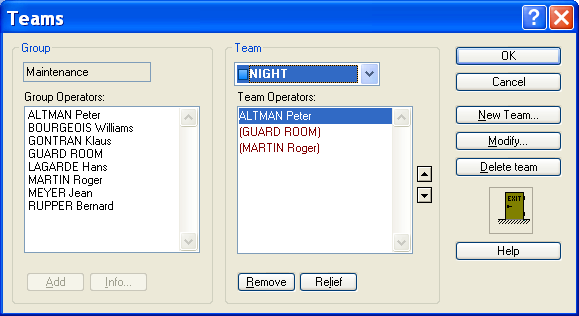
This dialog box shows the list of operators attached to the team selected in the Team drop down list, for the group designated in the field Group. It is called from the configuration of on call groups (see above) , by clicking on the "Teams..." button.
Group Name of the group to which the team is attached (group selected). Group Operators User list of the group to which the team is attached. To add a user to the current team, you can: select his name in the list then click on the button Add, click on his name in the list then drag it into the list of the team operators by keeping the mouse button pressed (release the button on the destination). A click on the Info... button or a double click in the list displays the form of the user selected in the list. Team Name of the selected team.
Click on the arrow of the drop -down list to select another team in the list of the teams attached to the current group. Team Operators List of the operators belonging to the current team. The marked in brackets operators are the relief operators. To change an operator to relief (or the opposite), you can: either select his name in the list then click on the button Relief, or double-click on this operator in the list. To modify the team's order (order of call), you can: either select an operator in the list then click on one of the buttons or , or click on an operator in the list then drag it to the wanted position. To remove an operator from this list, you can: either select his name in the list then click on the Remove button, or click on his name in the list then drag him to the "exit" icon by keeping the mouse button pressed (release the button on the destination) Button New team... Click on this button to create a new team. A dialog box is displayed to define the properties of the new team (see § 5.5.1 "Team properties"). Button Modify... Click on this button to edit the parameters of the team. A dialog box is displayed to edit and modify the properties of the team (see§ 5.5.1 "Team properties"). Button Delete team Click on this button to delete the current team. A message asking for confirmation is displayed before deleting the team.
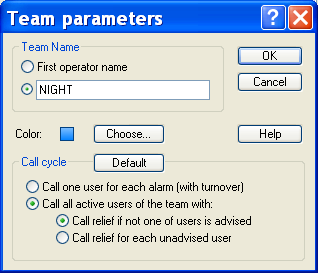
This dialog box defines the properties of an on-call team. It can be called by clicking on the New Team... button or on the Modify... button of the configuration dialog box of the on-call teams (see above). It also can be called from the main screen by selecting the Properties or Add a team entry of the contextual menu associated with the displayed list (list of teams of a group) or with the branch selected in the tree (branch <group name> or <team name>). See § 4.6.1.10 "Teams". One also can have access to this dialog box from the schedule screen by double - clicking on the desired team in the team list.
Team Name The name of the team can be explicitly defined by a name from 1 to 20 alphanumeric characters. By default, when the option First operator name is checked, the name of the team is th e name of the operator placed at the head of the list of the operators of the team. Color Displays the color selected for the team. This color allows the team to be visually identified in the schedules. When clicking on the Choose... button, a color palett e is displayed to select a new color for the team. Call cycle
- Selection of the team management mode: Call one user for each alarm, different for every alarm (operator turnover) Call all active users of the team (call broadcasting), with management of relie f operators according to options below.
- Definition of the call conditions for relief operators (only for call broadcasting): Call relief if not one of user is advised : a relief operator is called when none of the main operators of the team has been success fully reached (assures that at less one operator is warned). Call relief for each unadvised user : A relief operator is called every time a team's operator cannot be reached (assures that a constant number of operators are warned). Button Default This button reinitializes the team management options from the default options defined at the group level.