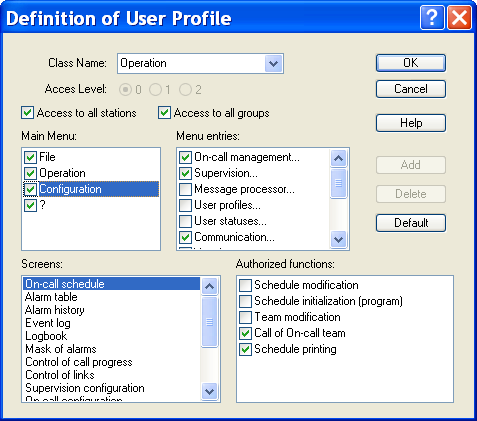
User Profiles
- Max numbers This dropdown list defines the maximum size of the number sequence displayable in th e schedule (number of stackable lines by day row).
To define and configure usable user profiles, select the " User profiles..." command in the "Configuration" menu. In initial configuration, this command is only accessible for operators of "Sy stem" class (Level 2).
-
Class Name By default, 3 basic classes are defined, each associated with an access level. Operation (level 0): the operator has access only to operation of the app lication (no configuration). He cannot close the application. Control (level 1): the operator has access to the configuration of exploitation (alarms, on-call schedule,...), but he can't configure the user file nor parameter the basic environment (options, vocal server, ports, drivers,...). System (level 2): maximal level, access to all functions of the application. The class "(without user)" corresponds to the configuration of the application when there is no logged operator. It authorizes or not the vi sualization of certain operating screens. In this configuration, no command is authorized, nor can be authorized.
-
Access Level The access level associated with a user profile allows to assure compatibility with the old versions, by associating automatically with the defined level the corresponding basic class. It also allows to keep a permanent link between an operator and a basic class in the case where the defined class for the operator would be deleted. It can finally be used by the external applications to globally determine the rights of an operator (terminal server for example). The access level of a class is not modifiable for the 3 basic classes.
-
Option Access to all stations When this option is checked (state by default), the user attached to the defined class has access to the data of all stations (schedule, alarm table, alarm history ...). When this option is not checked, the user has only access to its station, excepted if he is declared as attached to all stations (see advanced parameters of the user properties).
-
Option Access to all groups When this option is checked (state by default), the user attached to the defined class has access to all the on -call groups, even those to which he does not belong (schedule, alarm table, alarm history ...). If this option is not checked, the user has only access to the on -call groups to which he does belong.
-
Main Menu Selection of authorized commands of the main menu that will be displayed for an operator having the selected profile. Validate or invalidate a menu by clicking on the corresponding checkbox. To select the authorized commands for a particular menu, click on the line of the menu in question: commands of the menu selected are presented in the "Menu entries" list.
Remarks:
The "File" menu cannot be disabled ("Login/Logout" command is mandatory). The "Configuration" menu cannot be suppress for the basic class of level 2 ("System" by default).
- Menu entries Selection of authorized commands in the menu selected into the "Main Menu" list. Validate or invalidate a menu by clicking on the corresponding checkbox.
Remarks:
The "Login" and "Logout" commands of the "File" menu are not displayed, in the measure where they cannot be disabled. The "User profiles..." command of the "Configuration" menu canno t be disabled for the basic class of level 2 ("System").
- Screens This list displays the different screens that can be customized. To select the authorized commands in a particular screen, click on the line of the screen in question: the possible commands for this screen are presented in the Authorized functions list.
- Authorized functions This list defines the display options and the authorized functions on the screen selected in the Screens list. To Validate or invalidate a function, click on the corresponding checkbox.