On Call Groups
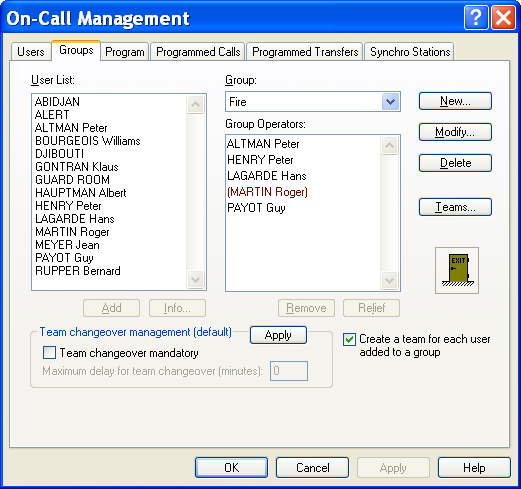
To define and configure the on call groups and teams, select the "On call management..." command in the " Configuration" menu, or click on the button . This dialog box also can be called from the contextual menu associa ted with the " On-call Management " in branch the tree of the main screen (see § On-call groups "On-call groups"). On the displayed dialog box, select the "Groups" tab.
This dialog box displays the list of operators attached to the group selected in the "Group" drop down list. Group Name of the selected group. If the group is attached to a station different from the local station, the name of this station is displayed in brackets. Click on the arrow of the drop -down list to select another group in the list of the existing groups. User List List of all the defined operators (user file). To add an operator to the current group, you can:
either select its name in the list then click the Add button. or click on its name in the list then drag it into the list of the operators of the group by keeping the mouse button pressed (release the button on the destination). A click on the butto n Information... or a double click in this list causes the form of the operator selected in the list to be displayed. Group Operators List of operators belonging to the selected group. The operators in brackets are the relief operators 1 of the group. To set an operator as relief operator (or set him back as main operator), you can: either select his name in the list then click on the Relief button, or double-click on this operator in the list. To remove an operator of this list, you can: either select its name in the list then to click the Remove button, or click on his name in the list then drag it to the "exit" icon by keeping the mouse button pressed (release the button on the destination). Button New... Click on this button to create a new group. A dialog box is displayed for the configuration of the properties of the new group (see § 5.4.1 "On-call group properties"). Button Modify... Click on this button to open the property dialog box of the selected group (see § 5.4.1 "On-call group properties"). Button Delete This button allows the current group to be deleted. A message asking for confirmation is displayed when this choice is performed. Button Teams... This button gives access to the configuration of the teams of the group (see § 5.5 "On call teams"). Team changeover management
- Team changeover mandatory This option defines the default management mode of the team changeover. It predefines the team changeover mode for each new created group. It does not modify the team changeover mode for the existing groups, except when clicking on the Apply button. When this option is checked, the on-call users have to clock in and out (see § 6.15 "Team changeover"). One of the users of the new on -call team has to clock in at the scheduled changeover time within a configurable deadline. If the team changeover has not been performed when the deadline is reached, a team changeover fault is signaled with possibility of trigging an alarm. Similarly at the end of the on -call period, if no other team is planned, one of the users of the on -call team has to clock out. Failing which the team will remain on-call beyond the planned period.
1 A relief operator is called on alarm only when no one of main operators has been joined, or (in option) at least one of the main operators has not been joined.
- Maximum delay for team changeover This option defines the default value of the maximum accepted delay to clock in fr om the planned beginning time of the on -call period. This option predefines the default delay for each new created group. It does not modify the default delay for the existing groups, except when clicking on the Apply button. When clocking in, this delay is proposed by default for waiting the next team changeover. The proposed time can be modified.
- Button Apply Click on this button to reinitialize the team changeover options (team changeover mandatory and maximum authorized delay) for all the existing gro ups with the values defined in this dialog box. A message is displayed for confirmation. Option Create a team for each user added to a group This option validates the automatic creation of a new team every time an operator is added to a group. At beginnin g, the created team contains only one operator, the operator added to the group, and is designated by the name of this operator. This option avoids the team configuration when the on -call organization does not require several operators to be called at a time. This option, validated by default, is general and concerns all groups.
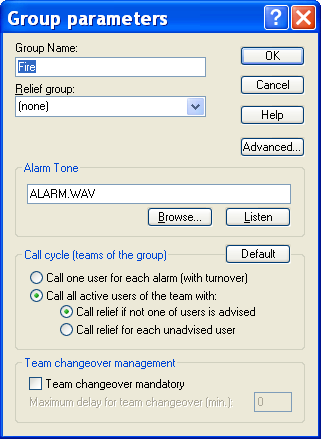
This dialog box defines the properties of an on-call group. It can be called by clicking on the " New..." button or on the " Modify..." button of the dialog box of on-call group configuration (see above). It also can be called from the main screen by selecting the Properties or Add a group entry in the contextual menu associated with the displayed list (group list) or with the branch selected in the " On-Call Management" sub-tree of the main screen (see § 4.6.1.9 "On-call groups").
The following properties can be configured:
Group name The group name must be defined: 1 to 20 alphanumeric characters. Relief group A group can be designated as relief group. The group selected as relief group will be only called when there is no planned team to call in the schedule of the main gro up or when the call cycle of the main group failed. If the choice "(none)" is selected, there is no group designated as relief for the actual group. Alarm tone The displayed file name, when it is not empty, designates a sound file which contains the alarm tone to play when an alarm is detected that concerns the group. That tone will be played only if the option "play group tone" is checked in the alarm options (see § 7.4 "Alarm options") or for alarms having an associated "Play tone" action without sound file specified (see § 5.15.7 "Play Tone").
-
Button Browse... Click on this button to browse files for a sound file con taining an alarm sound to assign to the group.
-
Button Listen Click on this button to listen to the alarm sound selected for the group. Call cycle This group defines the default options for the management of the teams of the group:
-
Selection of the team management mode: Call one user for each alarm, different for every alarm (operator turnover) Call all active users of the team (call broadcasting), with management of relief operators according to options below.
-
Definition of the call conditions for relief operators (only for call broadcasting): Call relief if not one of user is advised : a relief operator is called when none of the main operators of the team has been successfully reached (assures that at less one operator is warned). Call relief for each unad vised user : a relief operator is called every time a team's operator cannot be reached (assures that a constant number of operators are warned).
-
Button Default This button reinitializes the management options for the teams of the group from the default options defined in the general call options. Team changeover management
-
Team changeover mandatory This option defines the default management mode of the team changeover. When this option is checked, the on -call users off the group have to clock in and out. One of the users of the new on -call team has to clock in at the scheduled changeover time within a configurable deadline. If the team changeover has not been performed when the deadline is reached, a team changeover fault is signaled with possibility of trigging an alarm. Similarly at the end of the on -call period, if no other team is planned, one of the users of the on -call team has to clock out. Failing which the team will remain on-call beyond the planned period.
-
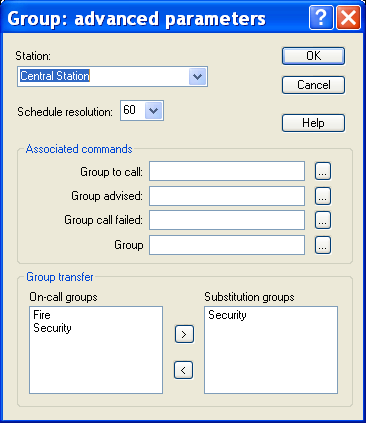
Maximum delay for team changeover This option defines for the group the default value of the maximum accepted delay to clock in from the planned beginning time of the on -call period. When clocking in, this delay is proposed by default for waiting the next team changeover. The proposed time can still be modified at this time. Button Advanced... This button gives access to the advanced parameters of the group.
Station This drop-down list selects the station to which the group is attached. This information is only used to discriminate groups with same name on different sites. By default, the name of the local station is proposed. Resolution Display resolution for the group schedule (minimum time slots). Associated commands This opti on group defines the commands that can been transmitted to an external application when the group changes of state:
- Group to call: command to transmit when the group goes to call state (at least one not acknowledged alarm).
- Group advised : command to transm it when the group is considered as warned (successful call).
- Group call failed : command to transmit when the call of the group is considered as failed.
- Group acknowledged : command to transmit when all the alarms attached to the group have been acknowledged (the group is not any more to call). Type the command in the edit field or click on the button to select an existing command or to define a new command (see § 8.9 "Command driver"). Group transfer This control group defines the list of groups that can be proposed to transfer the alarm calls directed to the group (see § 6.18 "Group transfer"). The list On-call groups displays the list of on-call groups defined for the attached station.