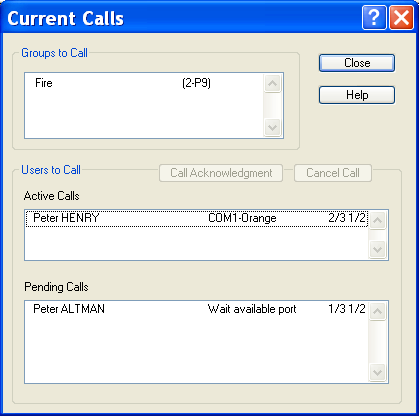
List of Calls in Progress
Synchronization options
The synchronization options are:
- Date and time . The calling station set the date of the called station. To be able to set the date and time, the called station needs to select the Alert driver option: "Date and time updates enabled".
- Configuration synchronization . If the local station is the main station, the synchronized data are the data associated to the called station. If the local station is a remote station, the synchronized data are its own data. For both case, one can send and/or receive all the configuration data or only the modified data (since the last synchronization). The synchronized data are the users, the on call groups, the teams, the tag groups, the on - call schedule and the tags. Validation / Transmission To begin the synchronization, click on the Send>> button. Clicking on the OK button exits the dialog box with recording of the list of synchronization options for a later transmission.
To examine the current calls state or to locally acknowledge a call , select the Calls in progress... command of the Operation menu, or just click on the button .
This dialog box is modeless (this means that the user can continue to use the others functions of the application) and is updated in real-time. Groups to Call List of all the on call groups for which at least a call was required: 1st column: name of the group. 2nd column: number of alarm call requests, followed by the priority level of the most important active alarm. 3rd column: "T1/Tm A1/Am" T1 = number of performed call attempts (current call included) Tm = max number of call attempts A1 = current iteration of call acknowledgment waiting Am = max number of iterations of call acknowledgment waiting Active Calles List of the calls in progress. 1st column: name of the called user. 2nd column: port - driver name (used for the call). 3rd column: "T1/Tm A1/Am" T1 = number of performed call attempts Tm = max number of call attempts A1 = current iteration of call acknowledgment waiting Am = max number of iterations of call acknowledgment waiting Pending Calls List of the suspended or waiting calls. 1st column: name of the user to call 2nd column: cause of suspension or waiting Button Call Acknowledgment Click on this button to acknowledge the call for the user who is selected either in the list of calls in progress, or in the list of pending calls. When a call is acknowledged by an operator, the reference of the call disappears from the list (of calls in progress or pending calls). If the call was in progress, it is aborted. Button Cancel Call Click on this button to abort the call (without acknowledgment) for the user who is selected either in the list of calls in progress, or in the list of pending calls.