File Transfer
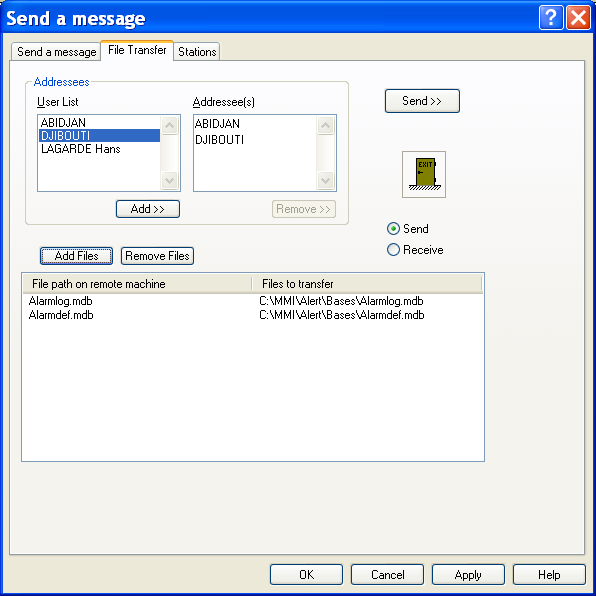
To transmit files to one or more operators, select the Send a message... command from the Operation menu, or just click on the button , then select the tab File Transfer:
Addressees The list on the left top of the dialog box displays the users configured with a number associated with driver allowing the file transfer (Email, Alert Modem, Alert Sock et, Alert Direct). To select a user to reach, you can:
-
either select his name in the list then click on the Add button,
-
or click on his name in the list then drag it over the list of addressees. A double-click in this list displays the properties of the selected user In case of error, to remove a user from the list, you can:
-
either select his name in the list then click on the Remove button,
-
or click on his name in the list then drag and drop it over the "exit" icon. File selection The files to upload are designated in the transfer list. The right column describes the full path of the files on the local station. The left column gives the name and the path that will have the files on the target station. For a transfer by email, the files are attached files. Changes of name and path are ignored. For a transfer made by a synchronization driver (Alert Modem, Alert Socket, Alert Direct), the files will be copied in the download directory of the target station. This directory is defined on the target station in the parameters of the corresponding synchronization driver. Select the files to send by clicking on the Add Files button. This action displays a dialog box to browse and select the files to add to the file list. To remove files from the list, select them in the file list the click on the Remove Files button. Validation / Transmission
Select the transfer direction:
Send: the files are sent to the remote station (upload) Receive: the files are received from the remote station (download) Clicking on the Send >> button exits the dialog box with immediate transfer of the chosen files to the users selected as addressees. Clicking on the OK button exits the dialog box with recording of the list of files to transfer with their destination directory for a later transmission.