Command Driver
This driver is used for the centralized management of alarms. It allows the synchronization of remote Alert stations with one or several central Alert stations.
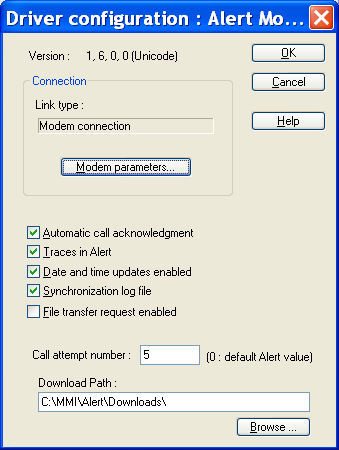
The Connection group defines the parameters of the connection taken in charge by the driver.
- The Link type field defines the type of the link. The content of this field cannot be edited and depends on the selected driver: Alert Direct direct connection Alert Modem modem connection Alert Socket TCP/IP connection.
- The extra parameters depend on the type of connection. In the case of a direct link, there are no extra parameters. For a modem connection, a button gives access to the modem parameters. For a TCP/IP connection, a field defines the IP port that will be used by the driver. When the Automatic call acknowledgment option is checked, it is not necessary to call back Alert to confirm the reception. The Trace in Alert option activates the trace of the driver work in the event log. When the option Date and time updates enabled is checked, a synchronization call can modify the system date and time.
Appendix
The station synchronization call can be described in a file called "StationName.log" if the Synchronization log file option is selected. The value given in Call attempt number is the call attempt number, in case of call failure, specific to this driver. If null, the number of attempt is the d efault one defined in Alert options. The Download path field defines the path of the directory in which the files downloaded by Alert will be copied. If the user specifies a path in the file transfer dialog box, this path will be added to the path defined here.