ALERT as Service
Appendix
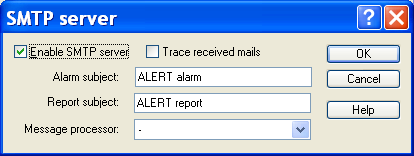
SMTP server The SMPTP server... button gives access to the parameter box of the SMPTP server of Alert to directly receive the messages without having to use a mail account.
- The Enable SMTP server Option allows the activation of the SMTP server for the reception of email by Alert.
- The Report subject field defines the subject of the mail that will be processed as reports.
- All the mails received with the subject defined in the Alarm object field will set, reset or acknowledge alarms in Alert. (See below for the syntax to use).
- The Message processor dropdown list selects a message processor script that will be in charge of processing the received mails. Only the type "API" scripts are proposed. Connection parameters The Connection button gives access to the dialog box of configuration of the connection parameters.
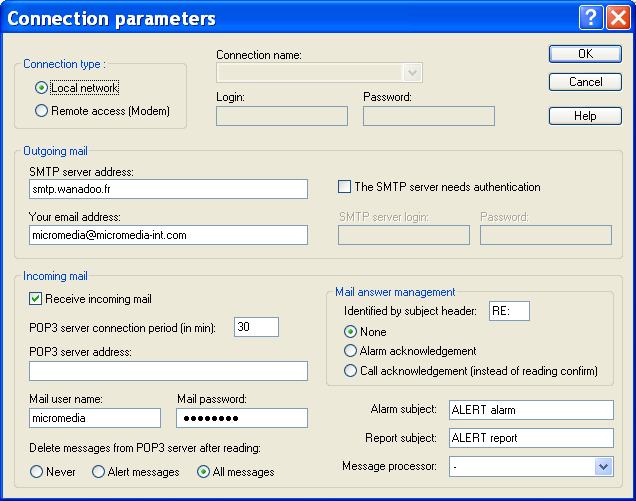
That dialog box allows the connection parameters to the mail servers to be modified. The group Connection type defines the type of connection to use and the attached parameters to connect to the mail server.
- The LAN / Modem radio buttons specify the access mode to the mail server: local network (LAN) or Dial-Up networking (modem).
- The Connection name dropdown list selects, in case of a modem connection, the "Dial - Up networking connection" to use to reach the mail server. In that case, the user account and password that have been assigned by the Internet provider have to be defined in the fields Login and Password. The group Outgoing mail defines the parameters attached to the mails to send.
- The SMTP server address field provides the network address of the mail server (machine name such as "mail.compuserve.com", or a dotted number such as "128.56.22.8").
- The field Your email address must contain the e -mail address of the sender (us ed for receipt acknowledgment and reports).
- If the SMTP server requires an authentication, check the box The SMTP server needs authentication then define the associated identifier and password in the fields below. The group Incoming mail defines the parameters attached to the emails reception.
- The Receive incoming mail check box validates or not the email reception. When this box is checked the following controls are enabled.
- The POP3 server connection period defines the polling period of the POP3 server (i n minutes) to retrieve the received mails.
- The POP3 server address field provides the network address of the pop3 server used to get the received mails.
- The fields Mail user name and Mail password define the login information required by the POP3 server.
- The radio buttons delete messages fromPOP3 server after reading define the archive mode of received mails on the POP3 server
- The Report subject field is a filter for selecting the emails which will create Alert reports (these mails can contain attached files).
- All the emails received with the subject given in Alarm subject will set, reset or acknowledge an alarm in Alert. The mail body should describe the alarm. To do this, the sender can use the following syntax: Type1:Value1; Type2:Value2; ...
The defined types are:
IDENT alarm identifier STATE alarm state (0: reset, 1: set, 2: acknowledgement) PRIORITY alarm priority (0 to 999) ALPHAMESSAGE alphanumeric alarm message ALPHAMESSAGERST alphanumeric message for alarm reset ALPHAMESSAGEACK alphanumeric message for alarm acknowledgment NUMMESSAGE numeric alarm message NUMMESSAGERST numeric message for alarm reset NUMMESSAGEACK numeric message for alarm acknowledgment
Appendix
CALLGROUP alarm call-group (created if not exist) CALLGROUPRST reset call-group (created if not exist) CALLGROUPACK acknowledgment call-group (created if not exist) ALARMGROUP alarm alarm-group (created if not exist) Only the IDENT field is mandatory. The driver can manage only one alarm per mail.
- The Message processor dropdown list selects a message processor script that will be in charge of processing the received mails. Only the type "API" scripts are proposed. The group Mail answer management defines the treatment to perform on reception of emails in response to the transmitted emails.
- The Identified by subject header field defines the header identifying the answers in the subject of received mails ("RE" by default).
- The radio buttons below define the treatment that will be done on reception of answer emails identified as response to alarm emails: None, Alarm acknowledgment or Call acknowledgment. By default, the reading confirmation of an alarm email, automatically transmitted when opening the concerned email, is processed as a call acknowledgment. If the mail answer management option Call acknowled gment is selected, the call acknowledgment will require sending an explicit answer.