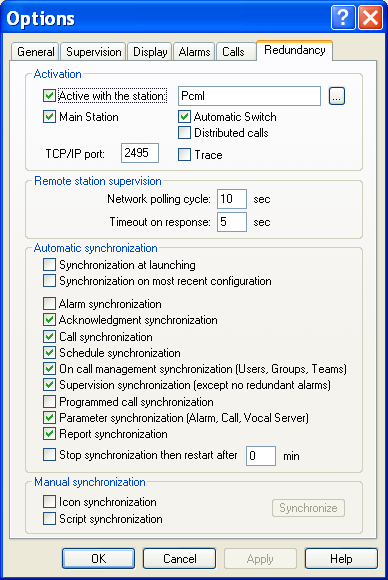
Redundancy Options
To configure the redundancy options, select the Options... command of the Configuration menu, then, on the displayed dialog box, select the Redundancy tab.
Activation This group defines the functioning of the application in redundant mode.
- The Active with the station option validates, when checked, the redundant mode with the station defined in the adjacent field (name of a computer on the network functioning in redundancy with t he local station). This name can be directly entered in the field or selected among the active computers of the network by c licking on the adjacent button . The redundant station also can be designated by its IP address.
- The Main Station option defines th e operating mode of the 2 redundant stations. The main station is the station that will be active when the 2 stations will normally function. So that the redundant mode functions correctly, it is necessary to define one of the 2
stations like main station (checked option) and the other station like secondary station (option not checked).
-
When the Automatic Switch option is checked (default option), the switching between the 2 stations is automatic when the active station goes to failure. Uncheck this option if you wish to control this switching from the external application.
-
When the Distributed calls option is checked, the calls are distributed between the 2 stations. If the main station does not have any available port for the type of call to perform, it automatically delegates the call to the other station. When this operating mode is chosen, switching between the stations is not necessary (Automatic Switch option not checked).
-
The TCP/IP Port field defines the number of the port used for the TCP/IP exch anges between the redundant stations. This number has to be modified only when the default proposed port (2495) is already used by another application on one of the redundant stations The selected TCP/IP port is this that will be used for the exchanges wit h the client stations.
-
The Trace option, when checked, displays a trace window to visualize the TCP/IP exchanges. Remote station supervision This group defines the parameters of the polling cycle of the remote station:
-
The network polling cycle defines the polling period of the remote station. A TCP/IP link control is performed at each period expiry. The timeout on response parameter defines the general timeout for waiting answer to each protocol request. Automatic synchronization This group defines the sy nchronization options of redundant stations and enables or not the synchronization of alarms, acknowledgments and configuration between the 2 stations:
-
Synchronization at launching : when this option is checked, the configuration of the remote station (declared in redundancy) is automatically retrieved when the application is launched.
-
Synchronization on the most recent configuration : when this option is validated, the dates of modification of the synchronized data between the redundant stations are compared to determine the values to keep for the synchronization. That option is especially useful during the automatic synchronization at launching when the configuration of each station has been modified on the both stations.
-
Alarm synchronization: alarms detected on a station are automatically reported to the other station. When the supervised application is redundant, this option is not necessary insofar as alarms are signaled on each station by their respective instance of the redundant application. However, that option can increase the efficiency of the redundancy insofar as it gives the possibility to continue to call for alarms from the other station in case of simultaneous failure of links on a station and communication ports on the other station.
-
Acknowledgment synchronization : the call and alarm acknowledgments performed on a station are automatically transmitted to the other station. When this option is checked, the alarm masking and unmasking are also synchronized.
-
Call synchronization: the call progress ion status on the active station is automatically transmitted to the other station.
-
Schedule synchronization : any modification of the schedule table of a group is automatically transmitted to the other station.
-
On call management synchronization : any modif ication of the on -call organization (operators, groups, teams, derogation...) is automatically transmitted to the other station.
-
Supervision synchronization : every modification of the tag list to supervise is automatically transmitted to the other station. The tags declared as no redundant are not transmitted.
-
Programmed call synchronization : any modification of the programmed calls and calls for synchronization with the remote stations is automatically transmitted to the other station.
-
Parameter synchronization: any modification of working parameters is automatically transmitted to the other station: alarm parameters, call parameters, working of the vocal server (messages and parameters).
-
Report synchronization: any modification of the logbook is automatica lly transmitted to the other station.
-
Stop synchronization: select this option to suspend the automatic synchronization of stations (during a maintenance operation for example). To automatically reactivate the synchronization after a given time, enter in t he adjacent field the wished time value for the synchronization suspension. Manual synchronization The following synchronizations are only performed on request, from the local station, by clicking on the Synchronize button.
-
Icon synchroniza tion: selection of the synchronization of icons defined in the tree of the main screen.
-
Script synchronization : selection of the synchronization of scripts and parameters of the message processor.