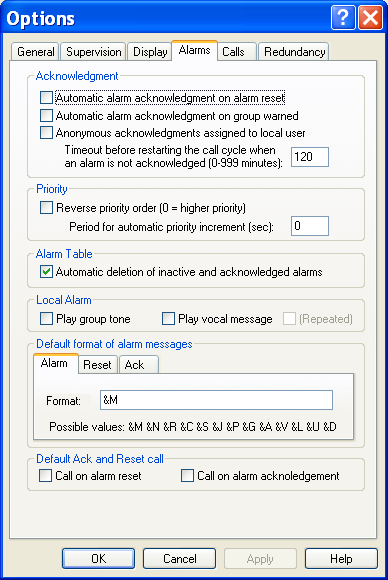
Alarm Options
To configure the alarm management options, select the Options... command of the Configuration menu, then, on the displayed dialog box, select the Alarms tab.
Acknowledgment This group defines the options associated with alarm acknowledgment:
-
Automatic alarm acknowledgment an alarm reset . This option enables the automatic acknowledgment of an alarm by so lving the problem which produced the alarm. This option can be redefined at the level of each alarm.
-
Automatic alarm acknowledgment on group warned . This option enables the automatic acknowledgment of an alarm when the concerned group is warned. This option can be redefined at the level of each alarm.
-
Anonymous acknowledgments dedicated to local user . This option allows anonymous acknowledgments (transmitted by a SCADA for example) to be identified by attributing them to the user who is locally logged.
-
Timeout before restarting the call cycle when an alarm is not acknowledged . This parameter defines the maximum time to acknowledge an alarm. This number can be between 0 and 999 minutes, the value 0 canceling all delay (no obligation to acknowledge the alarm). When this time expired (if the alarm has not been acknowledged meanwhile), the call cycle is restarted towards the team which is on duty at that moment. Priority
This group defines the priority management:
- Reverse priority order . This option defines the p riority order. When this option is not checked, the 0 priority is the lower priority. When this option is checked, the 0 priority is the higher priority.
- Period for automatic priority increment . Default cycle time for automatic increment of the priority o f an alarm when it is waiting to be transmitted. This functionality allows the priority of a waiting alarm to be promoted according to the elapsed time. The value 0 (default value) invalidates the automatic increment of waiting alarms. This parameter can be redefined at the level of each data server and each alarm. Alarm Table This group defines the options associated with the alarm table:
- Automatic deletion of inactive and acknowledged alarms . When this option is checked, alarms are automatically removed f rom the alarm table when they are both acknowledged and not active. Local Alarm This group defines the local sound treatment of the alarms:
- Play group tone . This option validates the local emission of the characteristic sound message of the concerned on ca ll group when an alarm is detected. If several groups are attached to an alarm, the played file will be the file of the first group defined in the list of the attached groups. Note: This option is validated for all the defined alarms attached to an on -call group having a sound file configured. It is also possible to play a sound file for a specific alarm by defining a "Play Tone" action for this alarm.
- Play vocal message . This option validates the local emission of the audio message attached to an alarm whe n an alarm is detected. This emission will follow the emission of the group sound message, if this emission is validated. If the (Repeated) box is checked, the message will be played in a continuous loop until the alarm acknowledgment. Note: This option is validated for all the defined alarms in the polling list. It is also possible to play the alarm message on the local station for a specific alarm by defining a "Play vocal message" action for this alarm. Default format of alarm messages This group defines the default format to use for the alarm messages (and reset or acknowledgment messages) that do not have specific format associated with. The message format defines a composite message that will be created at the event time of the concerned alarm, reset o r acknowledgment. It can contain some invariant parts, reproduced as they are, and some variable parts, that make reference to alarm parameters, by using the following syntax:
&M This field will be replaced by the alphanumeric message (long message) defined for the tag &R This field will be replaced by the external tag reference (DDE/OPC reference or other) &O This field will be replaced by the tag object identifier (OID) &N This field will be replaced by the name of the tag. &J This field will be replaced by the name of the data server of the tag. &C This field will be replaced by the alarm code (short message) defined for the tag &S This field will be replaced by the name of the station attached to the tag. &P This field will be replaced by the value of the priority of the tag &G This field will be replaced by the name of the basic alarm group associated with the tag &A This field will be replaced by the name of the call group associated with the tag &V This field will be replaced by the value of the tag at the alarm time. &V* This field will be replaced by the current value of the tag. &L This field will be replaced by the name of the station attached to the tag, if the station is not the local station. &U This field will be replaced by the name of t he user who acknowledges the alarm. &D This field will be replaced by the date and time of the alarm with the format "MM/DD/YY HH:MM/SS" If no default format is defined, the equivalent format will be "&M" to display the alarm message, if this last is defin ed, or "&R" to display the tag reference if the alarm message is not defined. Default Ack and Reset call This group defines the default call options on event reset and alarm acknowledgment. These options can be redefined at the level of each tag.
- Call option on alarm reset . If this option is checked, the reset of alarms for those the call option on event reset has not been specifically redefined will trigger a call to the attached group.
- Call on alarm acknowledgment . If this option is checked, the acknowle dgment of alarms for those the call option on alarm acknowledgment has not been specifically redefined will trigger a call to the attached group. In the both case, only operators having the corresponding call option will be called.