External Database Exportation
In order to extend the capabilities of the statistical treatment of alarms and calls, the application configuration and the alarm history, the call history (group and user calls) and the report log can be automatically exported to an external database. To set this functionality operational, the database export option has to be authorized by the software license and the Database export activation option must be checked in the general option dialog box (see § 7.1 "General options"). When the database export option is activated, some additional features are available:
- Enhanced history information (transmitted message)
- Capability of comment attachment to alarms
- Generation of report attached to alarms
- Real time and differed time call overview The exported data can be dispatched into 2 distinct databases, one for the storage of the ALERT configuration and one for the history storage. The link with these databases is defined by the data link files "AlertDB_AlarmDef.udl" (configuration database) and "AlertDB_AlarmLog.udl" (history database). A unique database can also be used to store the whole configuration and history data. To modify a link with a database, open the concerned file with the d ata source editor (by double-clicking on the file name) then modify the wished parameters. The tables in the databases are automatically created at the application launching.
The configuration database contains al the configuration d ata that are useful for the utilization of history data. It is automatically updated after each modification of the corresponding configuration data. By default, it is a database in the Microsoft Access format located in the "Bases" subdirectory: "AlarmDef.mdb". The configuration database includes the following tables:
- STATIONS: list of stations Field name Type Description StationId Numeric Station identifier StationName Text Station name
- GROUPS: list of functional groups Field name Type Description GroupId Numeric Group identifier GroupName Text Group ame
- CALLGROUPS: list of on-call groups
Appendix
Field name Type Description CallGroupId Numeric Group identifier GroupName Text Group name StationId Numeric Identifier of the attached station
- TEAMS: list of on-call teams Field name Type Description TeamId Numeric Team identifier TeamName Text Team name CallGroupId Numeric Identifier of the attached on-call group
- TAGS: list of supervised tags Field name Type Description TagId Numeric Tag identifier StationId Numeric Identifier of the attached station Label Text Alphanumeric identifier of the tag GroupId Numeric Identifier of the attached functional group CallGroupId Numeric Identifier of the attached on-call group Message Memo Associated text message Priority Numeric Tag priority
- USERPROFILES: list of user profiles Field name Type Description ProfileId Numérique Profile identifier ProfileName Text Profile name ProfileLevel Numérique Basic access level of the profile
- USERS: list of operators Field name Type Description UserId Numeric User identifier UserName Text User name UserFirstName Text User first name (can be NULL) StationId Numeric Identifier of the attached station UserNumericId Numeric Telephonic identifier o the user
ProfileId Numeric Identifier of the attached profile LanguageId Numeric Code of the user language UserType Numeric User type (1=virtual, 2=console, ...)
- DRIVERS: list of installed communication drivers Field name Type Description DriverId Numeric Driver identifier DriverName Text Driver name DriverType Numeric Driver type (vocal, fax, SMS, ...) CountryCode Text Country code (2 characters, NULL is not localized)
- CALLNUMBERS: list of call numbers Field name Type Description NumberId NumAuto Call number identifier UserId Numeric Identifier of the attached user EntryNumber Numeric Entry number in he user directory DriverId Numeric Identifier of the communication driver to use Address Text Call number or address
- CALLGROUPS_USERS: table for assignment of users to on-call groups Field name Type Description CallGroupUserId Numeric Link identifier CallGroupId Numeric Identifier of the attached on-call group UserId Numeric Identifier of the attached user Relief Boolean Relief indicator for operator in the group
- TEAMS_USERS: table for assignment of users to on-call teams Field name Type Description TeamUserId Numeric Link identifier TeamId Numeric Identifier of the attached on-call team UserId Numeric Identifier of the attached user UserIndex Numeric Position of the user in the team Relief Boolean Relief indicator for operator in the team
Appendix
The history database contains all the dynamic data recorded by the software: alarms, calls, reports. By default, it is a database in the Microsoft Access format lo cated in the "Bases" subdirectory: "AlarmLog.mdb". The history database includes the following tables:
-
ALARMLOG: history of alarms Field name Type Description AlarmLogId NumAuto Identifier of the alarm event TagId Numeric Identifier of the tag in alarm (cf. TAGS) AlarmTime Date/Time Timestamp of the alarm activation Message Memo Formatted alarm message ResetTime Date/Time Timestamp of the alarm reset UserId Numeric Identifier of the user who acknowledged the alarm (cf. USERS) AckTime Date/Time Time stamp of the alarm acknowledgment AlarmValue Text Tag value at the alarm time CommentText Mémo Comment associated with the alarm The alarm history table is updated in real time for every alarm event (activation, reset, acknowledgment).
-
CALLGROUPLOG: history of group calls Field name Type Description CallGroupLogId NumAuto Identifier of the group call CallGroupId Numeric Identifier of the on-call group (cf. CALLGROUPS) BeginTime Date/Time Timestamp of the begin of the call cycle EndTime Date/Time Timestamp of the end of the call cycle Status Numeric 0 = no call performed 1 = call aborted before the end of call cycle 2 = call transmitted (wait for call acknowledgment) 3 = unwarned group (call cycle failed) 4 = warned group (calls acknowledged) The cal l group table is updated at the beginning of the call cycle (EndTime and Status fields set to NULL) and at the end of the call cycle.
-
CALLLOG: history of user calls Field name Type Description CallLogId NumAuto Identifier of the user call UserId Numeric Identifier of the called user (cf. USERS) DriverId Numeric Identifier of the used communication driver (cf. DRIVERS) CallNumber Memo Called number BeginTime Date/Time Timestamp of the begin of the call EndTime Date/Time Timestamp of the end of the call Status Numeric 0 = no call performed 1 = call aborted 2 = call suspended 3 = call transmitted (wait for call acknowledgment) 4 = call failed 5 = call acknowledged 6 = call not acknowledged (failed) FailReport Text Detailed error report The call table i s updated at the beginning of the call (EndTime and Status fields set to NULL) and at the end of the call.
-
REPORTLOG: report log Field name Type Description ReportLogId NumAuto Identifier of the report ReportDate Date/Time Time stamp of the first report edition UserId Numeric Identifier of the report author (cf. USERS) TopicId Numeric Identifier of the report topic (cf. TOPICS) ReportText Memo Report content AudioFile Text Name of the attached audio file AtachedFile Memo List of attached files AlarmReport Boolean Indicator for alarm report The report log is updated after each report edition (creation or modification).
-
REPORTTOPIC: list of report topics Field name Type Description TopicId NumAuto Identifier TopicTexte Text Topic label
Appendix
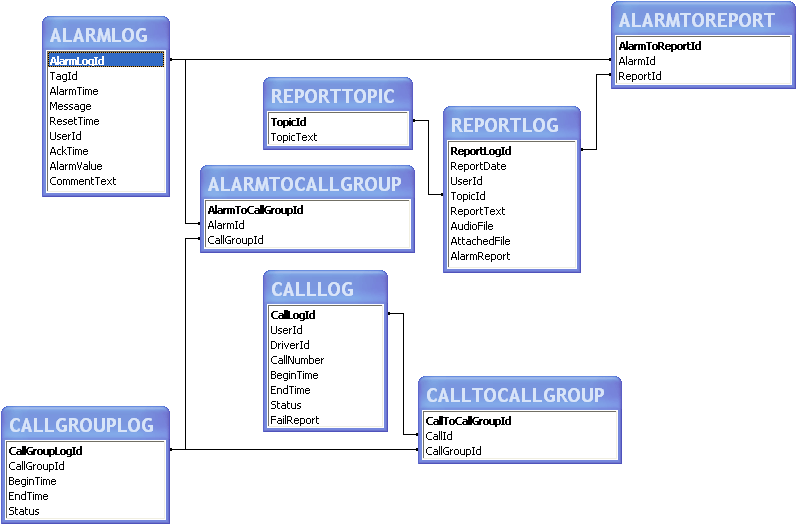
The follow ing tables contain the list of crossed references between the alarms and the consecutive group calls (ALRM TOCALLGROUP), between the group calls and the associated user calls (CALLTOCALLGROUP), and the alarms and the associated reports (ALARMTOREPORT).
- ALARMTOCALLGROUP: links alarms / group calls Field name Type Description AlarmToCallGroupId NumAuto Identifier AlarmId Numeric Identifier of the alarm event (cf. ALARMLOG) CallGroupId Numeric Identifier of the group call (cf. CALLGROUPLOG)
- CALLTOCALLGROUP: links user calls / group calls Field name Type Description CallToCallGroupId NumAuto Identifier CallId Numeric Identifier the user call (cf. CALLOG) CallGroupId Numeric Identifier of the group call (cf. CALLGROULOG)
- ALARMTOREPORT: links alarms / reports Field name Type Description AlarmToReportId NumAuto Identifier AlarmId Numeric Identifier of the alarm event (cf. ALARMLOG) ReportId Numeric Identifier of the report (cf. REPORTLOG)
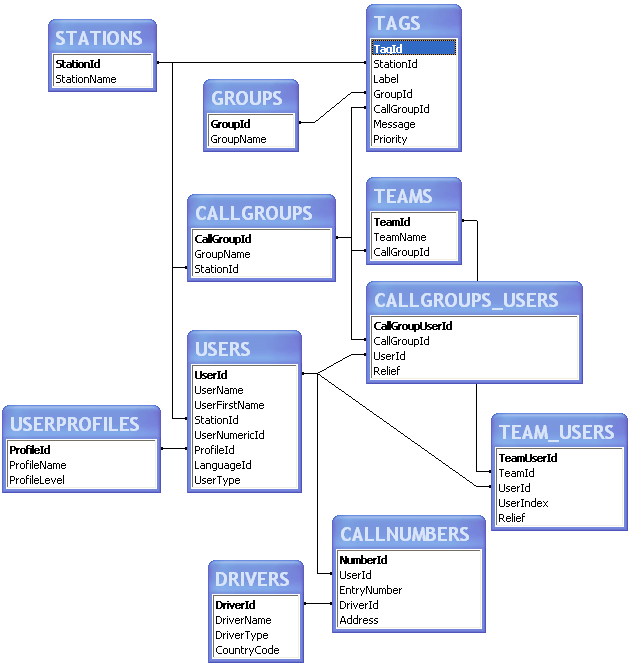
The relations between the different tables of th e databases "AlarmLog" and "AlarmDef" are described by the following schemas:
Relational schema of the configuration database
Appendix
Relational schema of the history database