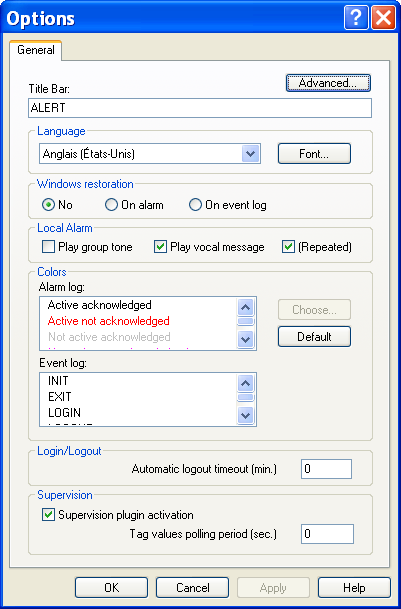
Client Station Options
To configure the specific options of the client sta tion, select the " Client Options... " command of the " Configuration" menu. This command in only available on the client station, after a session has been opened with the ALERT server station. The parameters defined in this dialog box are locally saved on the client station.
Advanced... button Click on this button to define the working mode of the client station at launching time (see § 7.1.1 "Advanced parameters"). Title bar This field defines the content of the title bar of the application (maximum 40 characters). The origin default title is "ALERT". Language
- Selection of the language of the user interface (menus, dialogs, me ssages, help, etc). This language can be different of that selected on the server station.
The defined language will be taken into account from validation by clicking the OK button.
- Click on the Font... button to select the character font to use in the user interface of the client station (font, style and size). Windows restoration Option of automatic activation of the client window. The activation of the client window results in the setting on foreground of the client window. If the latter were in icon, it is restored full screen.
- Choice on alarm : the client window is automatically reactivated on reception of an alarm.
- Choice on event log: the client window is automatically reactivated every time an event is logged in the journal (login, alarm, acknowledgment...). Local alarm This group defines the local sound treatment of the alarms on the client station:
- Play group tone . This option validates the emission on the client station of the characteristic sound message of the concerned on call group when an alar m is detected. If several groups are attached to an alarm, the played file will be the file of the first group defined in the list of the attached groups.
- Play vocal message . This option validates the emission on the client station of the audio message att ached to an alarm when an alarm is detected. This emission will follow the emission of the group sound message, if this emission is validated. If the (Repeated) box is checked, the message will be played in a continuous loop until the alarm acknowledgment. Colors Customization of colors representing the types of events in the event log and the state of alarms in the alarm table. Select an alarm state from the Alarm log list or a type of event from the Event log list then click on the Choose... button. Select the desired color in the displayed palette. The Default button restores the default configuration of the colors associated to alarm states and events. Login/Logout Define here the time after which the client station will be automatically disconnected if there was no user action in the middle time (mouse or keyboard action). The value 0 corresponds to an infinite time (no automatic logout). Supervision
- Check the box " Supervision plugin activation" to add an additional tab on the screen of the client statio n, displaying a WEB page for a graphical representation of alarms (alarm viewer synoptic, localization map...).
- Define in the field " Tag values polling period " the polling period of the client station to automatically refresh the value of the displayed tags. The value 0 invalidates the automatic refreshment of the value of the displayed tags.