Setup with Proxy, Without Registration
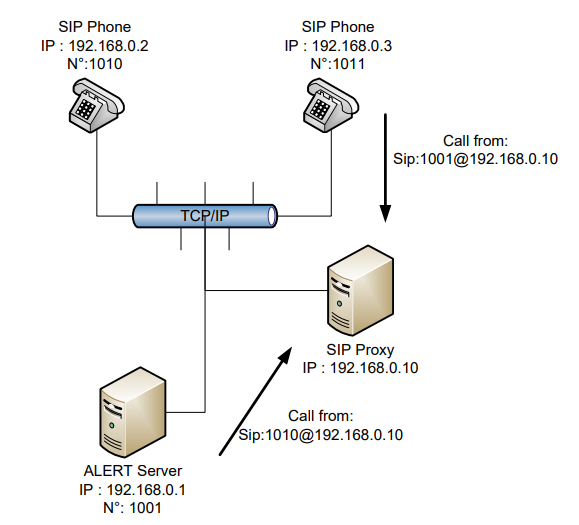
With this architecture, ALERT no longer needs to know the IP addresses of the phones. The proxy (typically an IPBX) manages the correspondence between telephone numbers and IP addresses.
User record configuration is thus simplified — only the phone number needs to be specified.
With this type of installation, URIs follow the format sip:username@realm, where:
realmis the domain name (usually the proxy address or machine name)usernameis a phone number
In this configuration, all calls go through the proxy. From the PBX point of view, ALERT acts as a SIP trunk.
This configuration supports Caller Name Identification to send text messages on SIP phones.
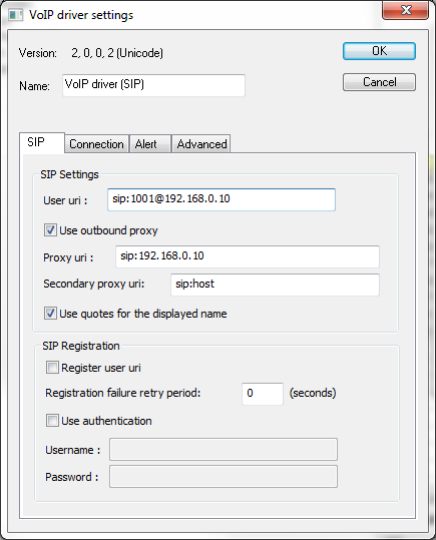
SIP Driver
In the driver properties, the Proxy field must be filled in. The user URI can be a phone number, as in the following example. The URI format is:
"Displayed name"<sip:name@domain>
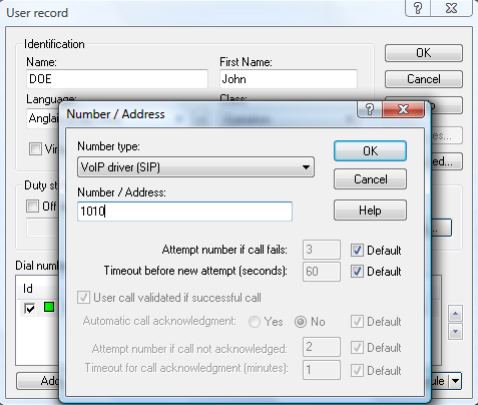
User Record
Configuration is simplified since all addresses share the same proxy. ALERT lets you specify either the full URI (as in the setup without proxy) or just the phone number.
For example, both of the following are equivalent:
sip:1010@192.168.0.10
1010
Usage Examples
Cisco CallManager — The CallManager acts as the proxy and manages the number-to-IP mapping. ALERT must also have a phone number so that operators can reach the voice server.
MV-310 VoIP/GSM gateway — The gateway acts as the proxy. ALERT can only place calls through this gateway.