ALERT - Add SIP Connection
Overview
Configuring a SIP (Voice over IP) connection in ALERT 4 requires two main steps: establishing a connection to the SIP system and creating a communication port.
Step 1 — Add a SIP Connection
- Open the Configuration menu
- Go to Communication > SIP Connections
- Add a new connection
SIP Tab
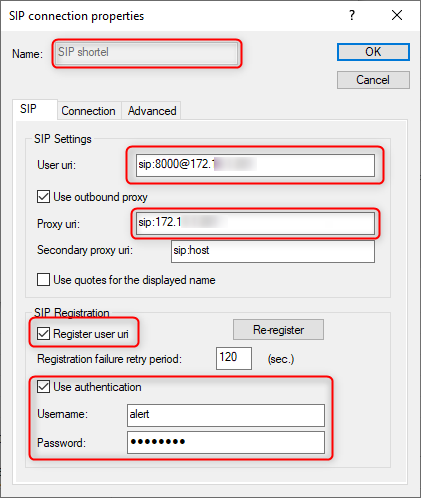
Your SIP provider supplies the following required parameters:
| Parameter | Description |
|---|---|
| Telephone number | Assigned number from the provider |
| SIP address | SIP service provider address |
| User ID | Connection credentials |
| Password | Connection credentials |
| URI format | sip: number@address |

Connection Tab
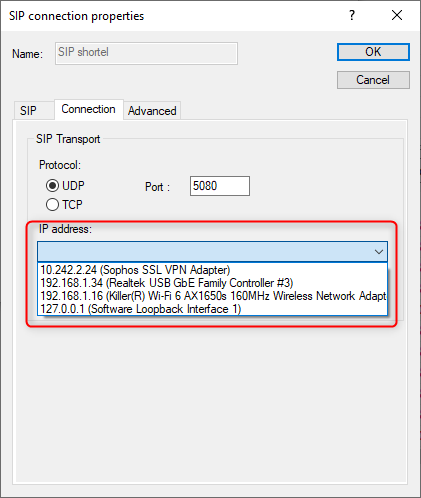
Select the network interface to use for SIP communications.
Upon successful validation, the ALERT event log confirms registration with the provider.
Step 2 — Add a SIP Port
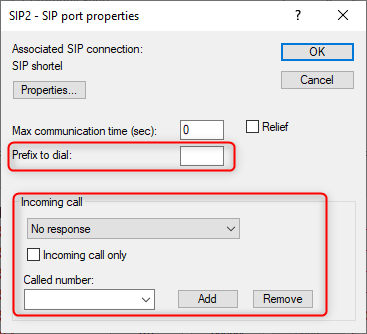
Once the connection is configured, add a SIP port to enable calling:
- Select the appropriate SIP connection
- Specify any necessary call prefixes
- Configure incoming call parameters
- Choose an answering driver or No response
- Reserve the port for incoming calls if needed


note
A green LED indicator confirms proper port configuration. Multiple concurrent calls require additional SIP ports if the provider supports it. The vocal driver must be enabled in ALERT.