ALERT - Add a Vocal GSM Modem
Overview
A GSM vocal modem enables voice calls and SMS functionality in ALERT. The modem must be connected to the machine directly on a serial port, or through a USB/Serial adapter, with an active SIM card inserted.

Adding the Modem
You must have sufficient administrative rights to perform this configuration.
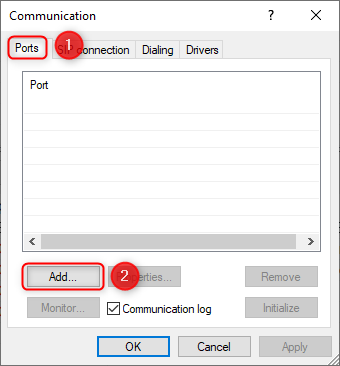
- Open the Configuration menu and go to Communication
- Navigate to the Ports tab
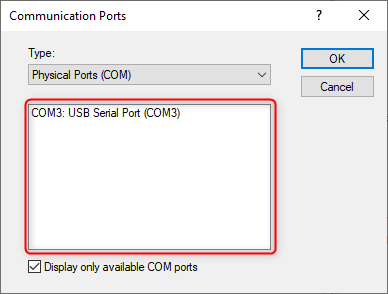
- Select the appropriate COM port (e.g. COM3)
- Confirm the addition
Configuration Requirements
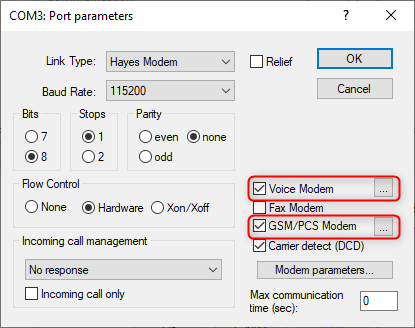
Enable the following two checkboxes:
- Voice Modem
- GSM/PCS Modem — required to allow voice calls
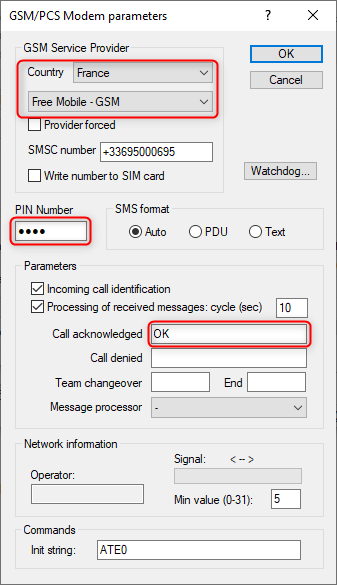
GSM Settings
Configure the following parameters:
- Country and SIM card provider identification
- PIN code entry
- Default parameters for call acknowledgment
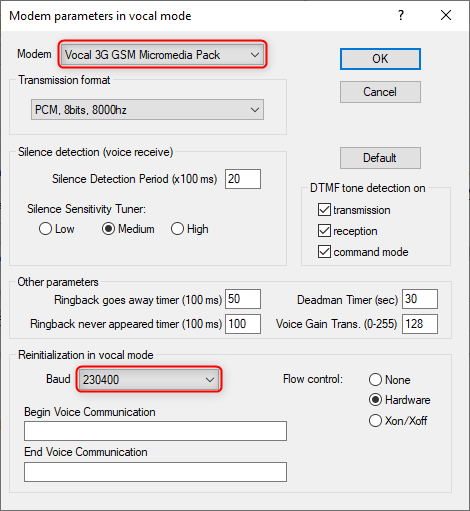
Voice Settings
The default modem supplied by Micromedia requires speed adjustment only if connected directly to the motherboard serial port (115200 baud rate).
Result
Once configured, the modem is enabled — the added port appears in green in ALERT.