Setup Without Proxy
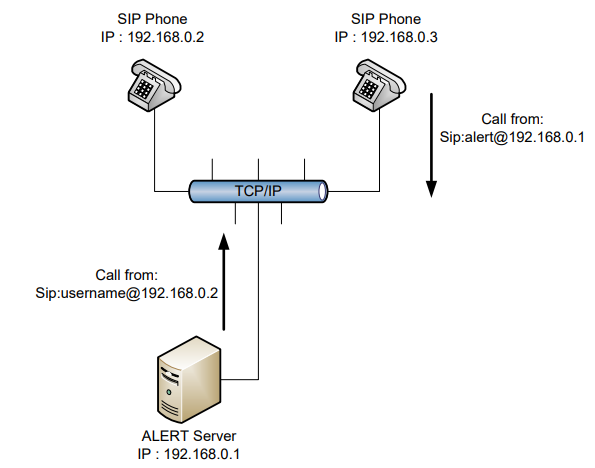
In this configuration, ALERT calls SIP phones or softphones directly. Since there is no intermediary (proxy or PBX) for routing calls, ALERT must know the IP addresses of each device.
SIP Driver
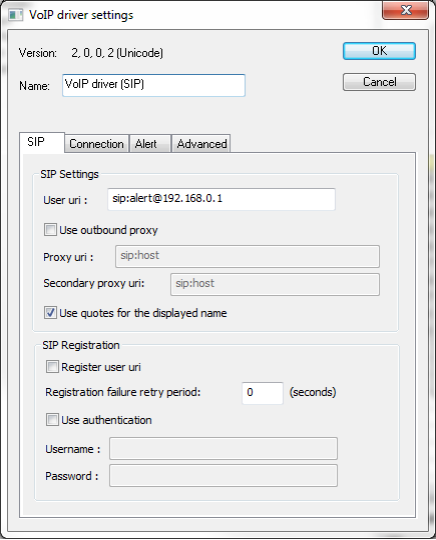
Use the default SIP protocol values. The IP address specified is that of the machine where the devices to contact are located. This same address also allows devices to contact ALERT.
The URI of the user matches the ALERT call number dialed from SIP phones. The URI format is:
"Displayed name"<sip:name@domain>
User Record
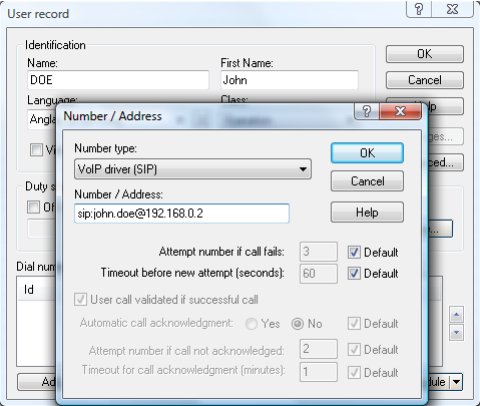
For the number to call, you must indicate the complete SIP address (URI) of the correspondent:
sip:username@ipaddress:port
The port is optional if you use the default SIP port: 5060.
Usage Examples
This configuration is used for small installations or for testing. SIP equipment is not managed centrally. It also allows you to have a softphone on the same machine as ALERT.
For example, if ALERT is on machine 192.168.0.1 and a softphone is installed on the same machine:
- ALERT listens on port 5080:
sip:alert@192.168.0.1:5080 - Softphone listens on the default port 5060:
sip:username@192.168.0.1